A UI/UX designer is not simply the person who makes screens look polished. The job is to turn a user need and a product goal into an experience people can understand, operate and trust.
In practical terms, a UI/UX designer investigates a problem, organises a task, designs interfaces and interactions, tests the proposed experience, and works with others to improve what gets built. On one team, the designer may cover that entire process. On another, researchers, content designers, UI specialists and product designers may share it.
This guide is for students and career switchers who want a realistic view of the role before choosing a course, building a portfolio or applying for junior positions. If the distinction between the two disciplines is still unclear, read UI vs UX first.
The role at a glance
- Understand: Learn about users, business needs and technical constraints.
- Define: Clarify the problem, task and information the experience must support.
- Explore: Compare flows, layouts and interaction approaches before committing.
- Design: Create wireframes, interfaces, components, states and prototypes.
- Evaluate: Test assumptions, identify friction and revise the design.
- Collaborate: Explain decisions and work with product, engineering and other specialists.
01 What is a UI/UX designer responsible for?
A UI/UX designer is responsible for the quality of the proposed experience, not for controlling every factor that affects it. They help the team decide what a person should be able to do, how information and actions should be arranged, and how the interface should communicate each state.
Imagine a fictional clinic wants to improve online appointment booking. “Design a booking screen” sounds like a visual task, but the designer first needs to understand what patients are trying to do. Do they choose a doctor, service or date first? What happens when a slot disappears? Which details are essential before confirmation? What accessibility, privacy and system constraints apply?
The designer turns those questions into a workable flow and interface. They may not own scheduling rules, clinical policy, development or final business approval, but they should expose unclear assumptions and help the team make informed choices.
02 What does a UI/UX designer do during a project?
The work is rarely a neat sequence. Research can challenge an early flow, technical feedback can change an interaction, and a usability test can send the team back to the problem definition. Still, most projects involve the following responsibilities.
Understand the problem and its context
The designer begins by clarifying the user, task, business objective and constraints. That can involve stakeholder conversations, existing feedback, support themes, product data, competitor or pattern reviews, and direct research with relevant users. The method should match the decision: a few interviews can explore motivations, while usage data can show where people leave a current flow.
Good designers separate evidence from assumption. “Patients abandon the form because it is too long” is a hypothesis until the team has suitable evidence. Research should narrow uncertainty, not decorate a preferred idea.
Organise information and user flows
Next, the designer maps how someone moves through the task. For appointment booking, the flow might cover service selection, available dates, patient details, review and confirmation. It must also account for less comfortable paths: no available slots, invalid information, interrupted sessions or a need to reschedule.
This is where information architecture, content order and interaction logic meet. A clear flow prevents the team from polishing screens that do not form a coherent experience.
Create wireframes and explore alternatives
Wireframes let a designer compare structure before investing in visual detail. One option might begin with the service; another might begin with an available date. The designer can discuss the trade-offs, prototype the uncertain parts and choose what to test.
Early work does not need to look impressive. Its job is to make ideas concrete enough to evaluate. A rough sketch that reveals a missing cancellation path is more valuable than a polished screen that hides it.
Design the interface and interaction states
UI work gives the flow a readable, consistent and operable form. The designer establishes hierarchy, spacing, typography, colour use, controls and components. They also specify what happens before, during and after an action.
- Default states: What the page shows before the user acts.
- Selected and focus states: How choices and keyboard position are communicated.
- Loading and empty states: What appears while data is retrieved or when no results exist.
- Error states: What went wrong, where it happened and how to recover.
- Success states: What was completed and what the user should expect next.
Designing only the ideal screen leaves important parts of the experience undefined. Responsive behaviour and accessibility also need attention before handoff, not as cosmetic fixes at the end.
Build prototypes and test assumptions
A prototype connects screens so the team can examine an interaction before building it. Its fidelity should suit the question. A clickable wireframe may be enough to test the order of steps; a more detailed prototype can help evaluate labels, feedback and visual hierarchy.
In a usability session, a designer gives a participant a realistic task, observes what happens and asks neutral follow-up questions. The goal is not to prove that the design is good. It is to learn where the proposal and the participant's expectations do not match.
Collaborate through implementation
A designer explains the intended behaviour to developers, reviews constraints, answers questions and checks the implemented experience. This is not a one-time “handoff.” A component may need a different response at a small viewport, content may exceed the sample length, or a platform constraint may require another approach.
The designer should identify which details protect the user's task and where there is room to adapt. Clear reasoning makes collaboration more useful than simply asking for pixel-level similarity.
03 What does the workflow look like in practice?
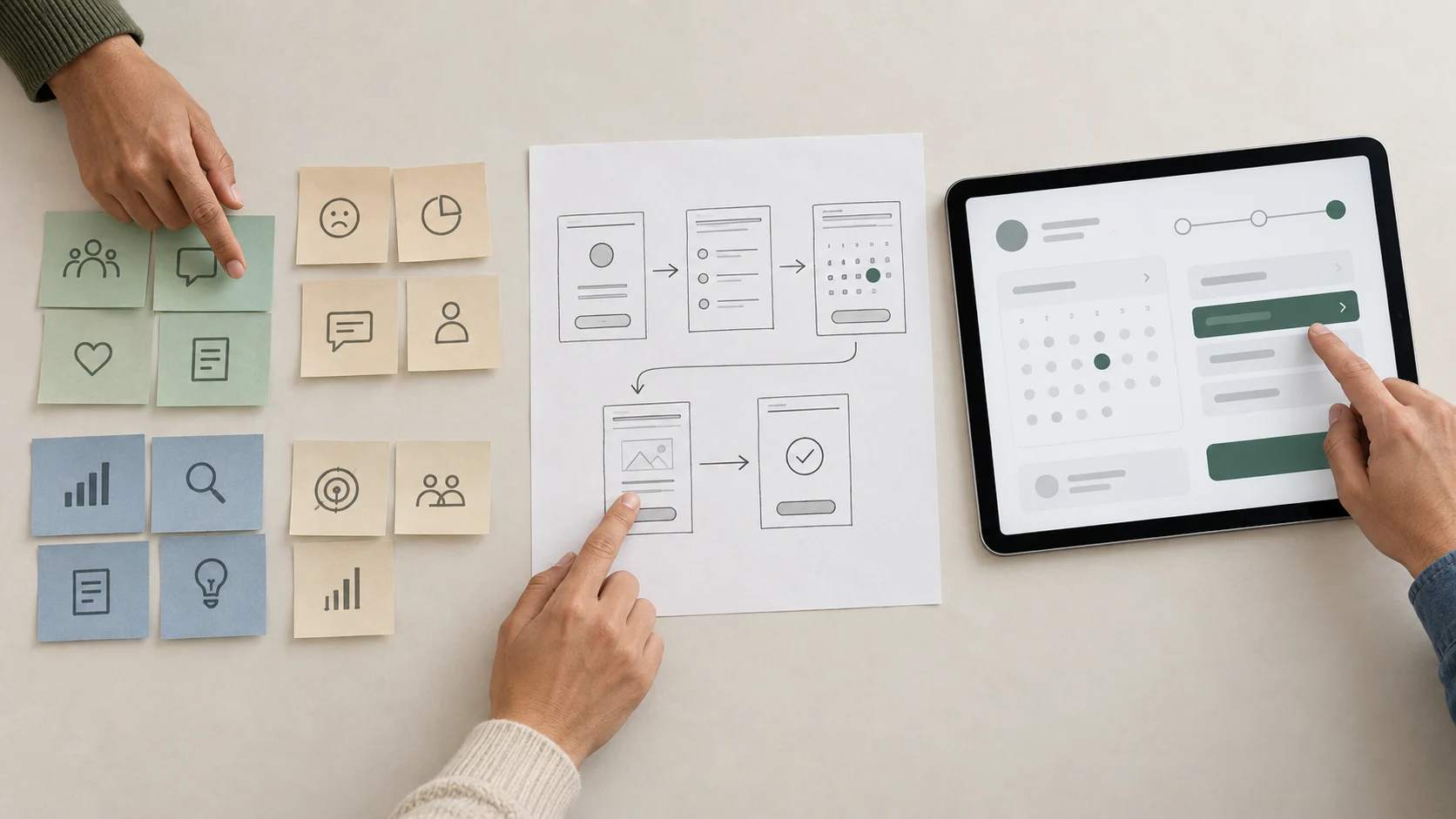
Suppose early evidence suggests that patients are uncertain whether they booked the right service. A UI/UX designer might frame the task as: help a patient choose an appropriate service and confirm the essential appointment details without implying medical advice.
They could then sketch two flows, review the content with the clinic team, prototype the selection and confirmation steps, and observe a small group of relevant participants using it. If people repeatedly miss the service description, the next revision might change its placement and wording rather than simply enlarge the final button.
The final design would document relevant components and states for implementation. After development, the team would check the responsive layout, keyboard path, error behaviour and live content. Real product evidence could then inform another iteration.
This example is illustrative, not a report of Zolve Academy research or a guarantee of results. Its purpose is to show that each visual decision should connect to a user task, evidence or constraint.
04 Which skills does a UI/UX designer need?
Strong UI/UX work combines reasoning, craft and communication. Beginners do not need mastery of every speciality, but they should understand how these skills connect.
- Problem framing: Turn a broad request into a clear user problem and decision to explore.
- Research basics: Choose appropriate methods, ask neutral questions and interpret evidence carefully.
- Information architecture: Group, label and sequence content so people can find and use it.
- Interaction design: Define tasks, navigation, controls, feedback and recovery paths.
- Visual interface design: Use hierarchy, typography, colour, spacing and grids intentionally.
- Prototyping: Make an idea testable at the level of detail the decision requires.
- Usability and accessibility: Evaluate whether people can understand and operate the experience in varied contexts.
- Communication: Present evidence, trade-offs and decisions clearly to teammates and stakeholders.
- Systems thinking: Design reusable patterns while accounting for content, edge cases and product constraints.
Tool knowledge matters, but it is easier to transfer a sound principle between tools than to transfer a memorised shortcut into an unfamiliar problem. For a foundation in the disciplines themselves, see what UI/UX design means.
05 Who does a UI/UX designer work with?
Design decisions affect and depend on other functions. A designer may work with a product manager to define scope, a researcher to plan a study, a content designer to clarify language, a developer to understand technical behaviour, and a subject specialist to check domain requirements.
Titles vary widely. A small company may expect one designer to research, create the UI and maintain components. A larger organisation may divide the same work among specialists. “Product designer” may describe a broad end-to-end role, while “UI designer” may focus more deeply on interface craft. These are tendencies, not universal definitions.
When reading a job description, look for the actual scope:
- Which problems and product area will the designer own?
- Who conducts and interprets user research?
- How much interface craft and design-system work is expected?
- Who writes product content and checks accessibility?
- How does the designer collaborate with engineering?
- How are design outcomes evaluated?
06 Common misconceptions about the role
- “The job is making attractive screens.” Visual quality matters, but the designer also defines structure, behaviour, feedback and task flow.
- “The designer should follow every stakeholder request.” Requests are inputs. The designer must understand the underlying need, surface trade-offs and help the team choose.
- “A prototype is the finished product.” A prototype can test an idea, but it does not prove production performance, accessibility, data accuracy or operational reliability.
- “One research session validates the design.” Testing reveals evidence within a particular scope. Findings must be interpreted carefully and combined with other constraints and signals.
- “Knowing Figma makes someone a designer.” Tools help produce artifacts. Design skill appears in the reasoning that connects the problem, evidence, proposal and evaluation.
- “UI/UX designers work alone.” Useful design requires continuous collaboration with the people who shape, build, support and use the product.
07 How can a beginner practise the real work?
Choose one contained task, such as booking an appointment, rescheduling a class or comparing two delivery options. Avoid redesigning an entire platform before you can explain one flow well.
- Write the task and audience: Be specific about who needs to accomplish what.
- List assumptions: Mark what you know, what you inferred and what needs evidence.
- Map the happy path and two edge cases: Include an error or unavailable state.
- Sketch alternatives: Compare at least two structures before choosing one.
- Create a focused prototype: Build only enough interaction to test the important question.
- Observe and revise: Record what participants did, not what you hoped they would do.
- Present the reasoning: Show how evidence and constraints changed your design.
That final explanation belongs in a portfolio case study. Employers and collaborators need to understand your decisions, not just see the last screen. Label self-initiated work honestly, protect participant privacy and avoid claiming business impact you did not measure.
08 Is UI/UX design the right path for you?
The role may suit you if you enjoy understanding why people struggle, organising complex information, exploring several solutions and refining details with a team. It also requires comfort with ambiguity, critique and repeated revision. The first idea is rarely the final answer.
Before committing, try the small project above and notice which parts hold your attention: research, flows, interface craft, prototyping or collaboration. That experience will help you choose a learning path more reliably than a job title alone.
To practise the full process with structured guidance, explore Zolve Academy's Professional UI/UX Design & AI-Powered Workflow Program. Review the modules on research, user flows, Figma, interface design, prototyping and usability testing, then use the course enquiry option to discuss your goals and starting point.
FAQ
Common questions about What Does a UI/UX Designer Actually Do? Roles, Skills and Responsibilities
A quick summary of the most common questions readers have about this topic.
A UI/UX designer learns what users need, maps how a task should work, designs the screens and interactions that support it, tests the proposed experience, and collaborates with a team to improve the implemented product. The exact mix depends on the role and organisation.
Coding is not required for every UI/UX role, but understanding responsive layouts, accessibility, component behaviour and technical constraints improves collaboration with developers. Read the job description because expectations differ between teams.
No. Figma can support wireframing, interface design and prototyping, but the work also involves problem framing, research, information structure, testing, communication and iteration. A tool records decisions; it does not replace the reasoning behind them.
The titles often overlap. Some organisations use product designer for a role that works across research, interaction and interface design, while UI/UX designer may describe a similar scope or a stronger interface focus. Compare responsibilities, decision authority and expected outputs rather than relying on the title alone.
Begin with user goals, task flows and basic research, then learn hierarchy, typography, spacing, responsive interface design, prototyping and usability testing. Build small projects that show how evidence and constraints led to your decisions.